Cytrence Launches Kiwi+ VGA, Simplifying IT Maintenance for Servers and Industrial Computers
Portable USB 3 KVM combines native VGA support, specialized server boot resolutions, switchable USB storage, and
Press Release Disclaimer: This is a press release distributed through the XPR Media network. It has not been independently verified by our newsroom.
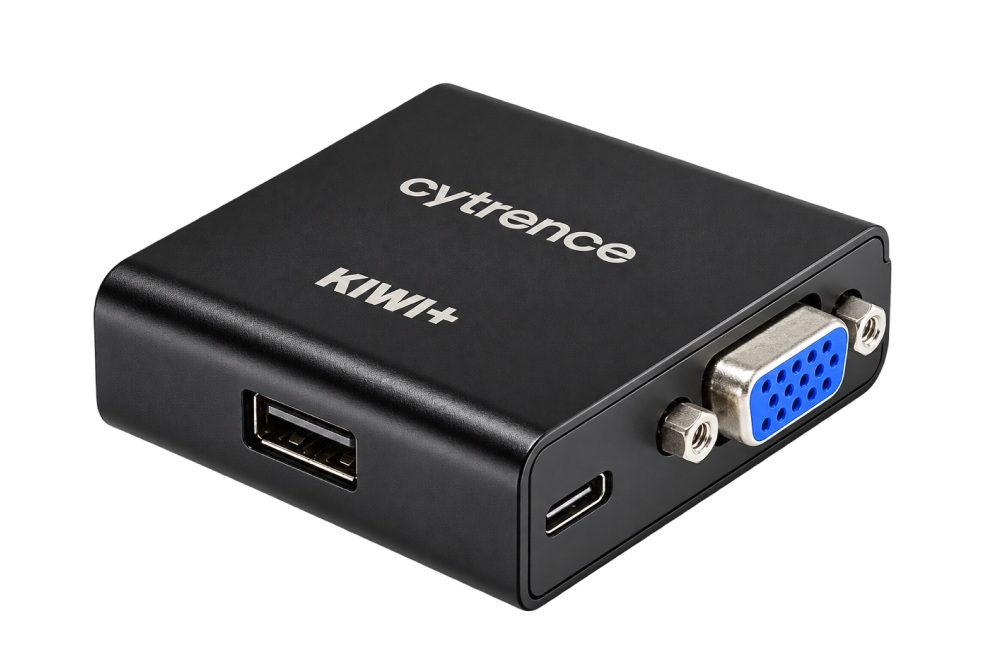

Portable USB 3 KVM combines native VGA support, specialized server boot resolutions, switchable USB storage, and simplified connectivity for IT professionals
BURLINGTON, MA, UNITED STATES, October 20, 2026 /EINPresswire.com/ — Cytrence Technologies Inc, creator of the Kiwi KVM family, today announced the launch of Kiwi+ VGA, a portable USB 3 KVM adapter designed to simplify direct access to servers, industrial computers, and other VGA-equipped systems. Combining native VGA video input, specialized display resolution support, simplified cabling, and an integrated switchable USB-A port, Kiwi+ VGA turns a technician’s laptop into a portable KVM console, offering a compact alternative to traditional IT crash carts for system setup, OS installation, troubleshooting, and maintenance.
NATIVE VGA SUPPORT DRIVEN BY CUSTOMER FEEDBACK
Built-in VGA connectivity has been one of the most frequently requested features from Kiwi KVM customers, particularly IT professionals maintaining servers, industrial PCs, and specialized equipment. Although existing Kiwi KVM models support VGA-equipped systems through VGA-to-HDMI converters, customers have expressed a strong preference for integrated VGA input to eliminate additional adapters and simplify setup.
Kiwi+ VGA addresses this demand by integrating VGA video capture directly into the Kiwi KVM hardware, providing a convenient solution for technicians working across diverse computing environments.
SUPPORTING SPECIALIZED VGA RESOLUTIONS
VGA remains widely used in enterprise servers, industrial computers, and embedded systems, where display requirements can differ significantly from those of modern desktop computers. Certain servers, including some Supermicro systems, output 720 × 400 at 70 Hz during boot – a video mode that many commercially available VGA-to-HDMI converters cannot handle properly. This can prevent technicians from viewing startup information or accessing BIOS configuration screens.
Kiwi+ VGA supports these specialized video modes, including 720 × 400 at 70 Hz, along with VGA resolutions up to 1920 × 1080 at 60 Hz. This compatibility helps technicians maintain console access from initial boot and BIOS configuration through operating system installation, troubleshooting, and recovery.
SIMPLIFIED CONNECTIVITY WITH VGA 2-IN-1 CABLE SUPPORT
Kiwi+ VGA supports VGA 2-in-1 cables, which combine VGA video and USB keyboard/mouse connections into a single cable assembly. With a compatible VGA 2-in-1 cable, technicians can connect a target computer to Kiwi+ VGA through one integrated cable, reducing cable clutter and simplifying deployment.
Because VGA 2-in-1 cables do not follow a universal industry standard for USB signal assignments, Cytrence evaluated existing configurations and selected a commonly used pin assignment, with USB 2.0 signal lines assigned to VGA pins 4 and 5. Conventional separate VGA and USB cable connections are also supported.
INTEGRATED USB SWITCHING FOR OS INSTALLATION AND RECOVERY
Beyond video, keyboard, and mouse control, Kiwi+ VGA incorporates the same switchable USB-A port available on the Kiwi+ USB model, allowing technicians to share a USB device between their laptop and the target computer.
For example, a technician can connect a USB drive to Kiwi+ VGA, flash an ISO image to the drive from their laptop, and then switch the USB drive to the target computer through the Kiwi application – without physically reconnecting the drive. This capability streamlines operating system installation, system recovery, diagnostics, and maintenance.
EXTENDING THE KIWI KVM FAMILY
Like other Kiwi KVM models, Kiwi+ VGA enables direct keyboard, mouse, and video access from Windows, macOS, or Linux laptops without installing software on the target computer or relying on its network connectivity. By replacing the separate monitor, keyboard, and mouse traditionally carried on an IT crash cart with a technician’s existing laptop, Kiwi+ VGA makes on-site server maintenance more portable and convenient.
“Native VGA support has been a recurring request from our customers,” said Dr. Hui Li, founder of Cytrence Technologies. “With Kiwi+ VGA, we focused on addressing practical challenges such as unusual server boot resolutions and cable complexity. Combined with integrated USB switching for OS installation and recovery, it gives IT professionals a more convenient way to install, troubleshoot, and maintain their systems.”
For product information and purchasing options, visit https://www.cytrence.com/kiwiplusvga.
ABOUT CYTRENCE
Cytrence Technologies Inc is a Boston-area technology company developing hardware and software solutions for computer access and management. Its Kiwi KVM family enables IT professionals, engineers, and developers to control computers directly from their laptops without requiring target-side software or network connectivity.
Kiwi KVM has been widely adopted across professional and enterprise environments, including NVIDIA DGX Spark workshops at GTC 2026, Amazon Robotics for device automation development, and Unisys for server and data center management. Kiwi is also used by universities for education and research, IT service providers and managed service providers (MSPs) for system maintenance, and embedded developers working with Raspberry Pi and other single-board computers (SBCs). Its applications have recently expanded into industrial computing and industrial PC (IPC) maintenance and control.
Cytrence develops its hardware, firmware, and software in-house, enabling close integration across the Kiwi platform and responsive technical support for professional and enterprise customers.
Website: https://www.cytrence.com/
media@cytrence.com
Cytrence Technologies, Inc.
Visit us on social media:
LinkedIn
Instagram
Facebook
YouTube
Legal Disclaimer:
EIN Presswire provides this news content “as is” without warranty of any kind. We do not accept any responsibility or liability
for the accuracy, content, images, videos, licenses, completeness, legality, or reliability of the information contained in this
article. If you have any complaints or copyright issues related to this article, kindly contact the author above.

Media gallery